
Whiteboard vs Flat Vector vs Clay: Picking Style by Concept Type
Match whiteboard, flat vector, or clay to concept type—process, UI, emotion, system—with defaults and anti-patterns, not a style gallery tour.
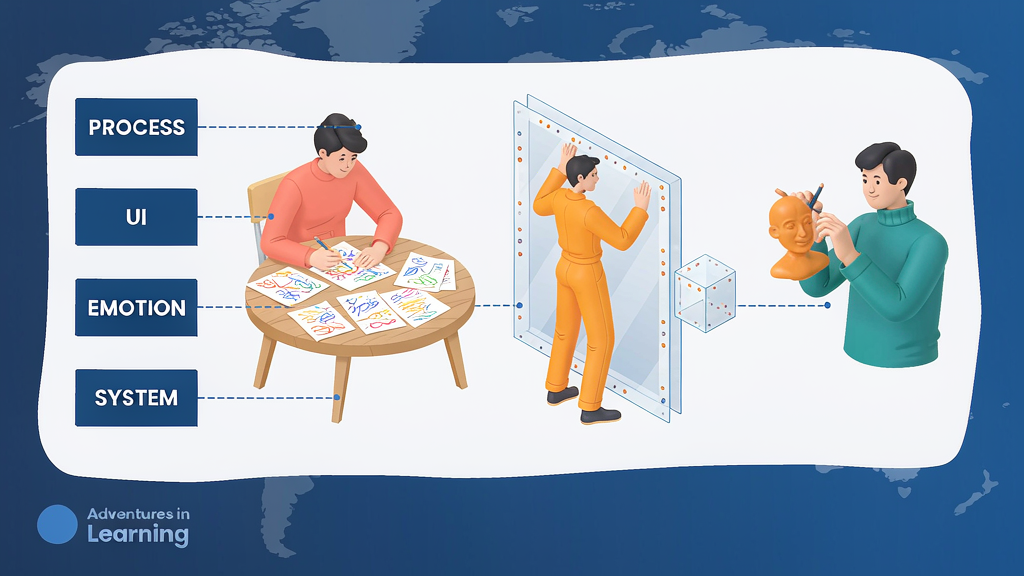
Whiteboard vs Flat Vector vs Clay: Picking Style by Concept Type
Pick whiteboard, flat vector, or clay by the concept type you are teaching—process, UI, emotion, or system—not by browsing a style gallery until something feels fresh.
A related overview of the three looks lives in whiteboard doodle vs flat vector vs claymation styles. This piece is the decision table: concept → default style → anti-patterns, so briefs stop arguing taste and start matching idea type.
Concept types (define before art direction)
| Concept type | What you are teaching | Viewer need |
|---|---|---|
| Process | Ordered steps, handoffs | Clear sequence |
| UI | Specific controls / states | Recognizable chrome |
| Emotion / stakes | Why it hurts / matters | Empathy without melodrama |
| System | Mental model, architecture | Spatial relationships |
| Hybrid | e.g. process + UI proof | Split beats by type |
If you cannot name the type, you are not ready to lock style.
Concept → style defaults
| Concept type | Default style | Why | Switch when |
|---|---|---|---|
| Process | Whiteboard / doodle | Feels like teaching; cheap to revise steps | Brand needs higher polish for paid |
| UI | Flat vector (or careful UI stills) | Readable crops; stable labels | Photoreal product shots required by brand |
| Emotion / stakes | Clay or soft 3D | Tangible metaphor; memorable | Regulated niche where toy-like hurts trust |
| System | Flat vector diagrams | Clean nodes/edges; mute-friendly | Whiteboard if deliberately "workshop" tone |
| Comparison of workflows | Flat vector side-by-side | Controlled layout | Avoid clay clutter |
Cross-check stylized vs photoreal needs with when stylized explainers beat photoreal and trust limits in when stylized looks hurt trust.
Anti-patterns by concept
- Clay for dense UI: fingers and soft shapes obscure controls; viewers cannot learn the click
- Whiteboard for pixel-level settings: lines get noisy; labels wobble; mute readability dies
- Flat vector for raw grief stories: can feel cold if stakes are human and sensitive—consider soft metaphor carefully or live action per brand
- One style for a hybrid Reel: process metaphor in clay, then muddy clay "UI"—split beats instead
- Style tourism mid-series: switching clay → whiteboard mid-week breaks recognition (batch from one style lock)
Decision checklist (5 minutes)
- Name concept type for the Reel (one primary)
- Pick default from the table
- Note one anti-pattern to avoid
- If hybrid, assign style per beat (metaphor vs proof)
- Lock style against concept on the board before render
- Only then discuss taste preferences inside the chosen family
Filled examples
Intent labeling process: whiteboard default → numbered steps → flat vector UI crop for the single proof beat.
Permissions matrix (system): flat vector nodes for roles → no clay.
Burnout stakes intro (emotion) then how-to: soft clay metaphor for 3s → cut to flat vector how-to. Do not stay in clay for the settings panel.
Regulated claims review: prefer flat vector + real UI; avoid playful clay that undercuts seriousness.
Brief language that prevents gallery thrash
Write in the brief:
Concept type: process (+ UI proof beat). Default: whiteboard with flat-vector UI inserts. Anti-pattern: clay UI. Style lock ID: …
Do not write: "Make it pop" or "Like that viral clay ad."
Put the choice in scene notes vs style lock correctly: concept→style is a lock decision, not a per-line VO note.
When to revisit the default
Revisit only when:
- Metrics show confusion on UI proof beats
- Counsel/trust feedback flags tone
- Series ICP shifts (e.g. consumer → compliance buyers)
Do not revisit because a competitor posted clay this morning.
Agency briefing script
When you hire an agency, send concept type first:
Primary concept: system map of role permissions. Default style: flat vector. Proof beat: real UI crop, not illustrated chrome. Avoid: clay, photoreal office B-roll. Lock reference: [link].
Agencies that answer with a moodboard before naming concept type are guessing. Require the table row in the kickoff deck.
Mixing styles inside one Reel (rules)
Allowed:
- Metaphor beat in clay/whiteboard → proof beat in flat vector or UI still
- End card in brand flat vector regardless of metaphor style
Disallowed:
- Mid-proof style swap
- Three styles in 45 seconds
- Matching competitor's viral style for one campaign week while your series is vector
Hybrid is a beat-level choice, not a blender.
Measuring style fit
If UI proof beats lose hold while metaphor beats win, you probably used the wrong style on proof—or the crop is weak. Do not "fix" by going fully clay; fix the proof beat's style assignment. Pair with beyond-views measurement.
Personal IP vs product brand
Personal educator brands can lean whiteboard for process authority. Product brands often need flat vector for UI trust. Clay is a spice for emotion beats, not a default identity—unless your brand is tactile play and your ICP expects it.
Soft tool note
Lock style against concept type on the board before render so art direction follows the idea, not a moodboard scroll. Platforms such as Scro support that lock-on-board step; the concept→style table above still works in any brief template.